Xojo FPDF - Table Module
📊 Generate Beautiful Tables That Just Work
The Problem
Creating tables in PDFs is painful. You need to:
- Calculate column widths manually
- Handle text wrapping in cells
- Deal with page breaks mid-table
- Repeat headers on each page
- Align numbers and text differently
- Apply consistent styling
It’s tedious, error-prone, and time-consuming.
The Solution
The VNS PDF Table Module handles all the complexity for you. Three powerful table engines let you create anything from simple grids to sophisticated, multi-page reports with a single function call.
✨ Three Table Engines
1. SimpleTable - Quick & Clean
Perfect for basic data display with borders.
VNSPDFTablePremium.SimpleTable(pdf, headers, data)Features:
- Automatic column sizing
- Bold headers
- Clean borders
- Minimal code
2. ImprovedTable - Precision Control
Professional tables with custom widths and smart alignment.
VNSPDFTablePremium.ImprovedTable(pdf, headers, data, widths)
Features:
- Custom column widths
- Automatic number alignment (right-aligned)
- Automatic text alignment (left-aligned)
- Header repetition on page breaks
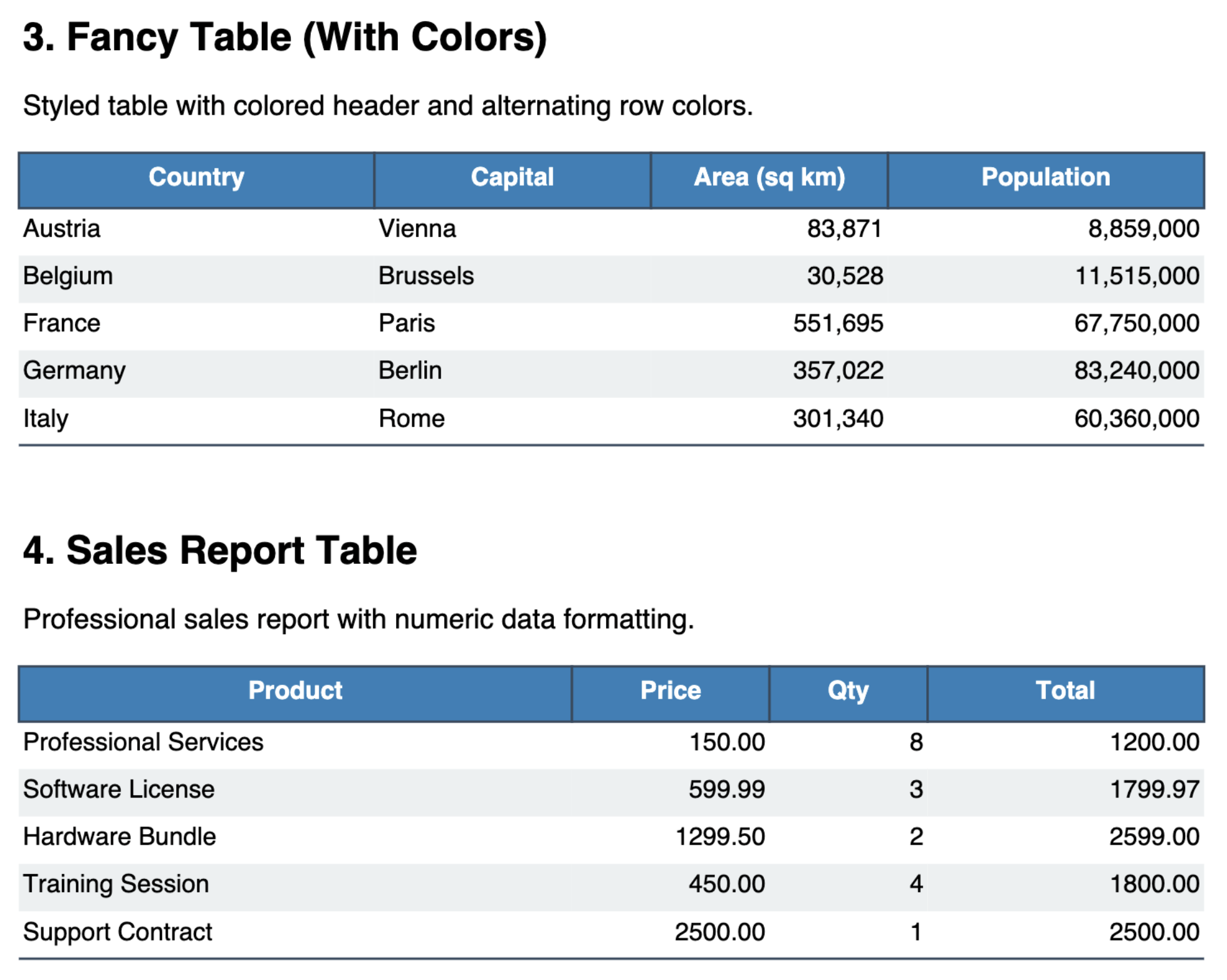
3. FancyTable - Maximum Impact
Stunning tables with colors, alternating rows, and custom styling.
VNSPDFTablePremium.FancyTable(pdf, headers, data, widths)
Features:
- Colored header backgrounds
- Alternating row colors (zebra striping)
- Custom fonts and sizes
- Professional appearance
💼 Perfect For
Financial Reports Balance sheets, income statements, ledgers, and transaction logs with perfect number alignment.
Inventory Management Product catalogs, stock lists, price sheets, and order summaries with thousands of rows.
Database Reports Export SQLite, MySQL, PostgreSQL query results directly to formatted PDF tables.
Invoices & Quotes Line items with descriptions, quantities, prices, and totals - automatically formatted.
Scientific Data Lab results, measurement tables, statistical data with precise column control.
HR Documents Employee rosters, timesheets, salary tables, and organizational charts.
🚀 Automatic Pagination
Never worry about page breaks again.
The Table Module automatically:
- ✅ Detects when a row won’t fit
- ✅ Adds a new page
- ✅ Repeats the header row
- ✅ Continues the table seamlessly
Handle 10 rows or 10,000 rows - it just works.
📊 Real-World Example
// Database-driven invoice with automatic styling
Dim headers() As String = Array("Item", "Description", "Qty", "Price", "Total")
Dim widths() As Double = Array(30, 80, 20, 25, 25)

// Query database
Dim rs As RowSet = db.SelectSQL("SELECT * FROM invoice_items WHERE invoice_id=123")

// Build data array
Dim data() As Variant
While Not rs.AfterLastRow
  Dim row() As Variant = Array(rs.Column("item").StringValue, _
                                rs.Column("desc").StringValue, _
                                rs.Column("qty").IntegerValue, _
                                rs.Column("price").DoubleValue, _
                                rs.Column("total").DoubleValue)
  data.Add(row)
  rs.MoveToNextRow
Wend

// Generate professional table - ONE line
VNSPDFTablePremium.FancyTable(pdf, headers, data, widths)
Result: A beautifully formatted invoice table with:
- Colored headers
- Right-aligned numbers
- Left-aligned text
- Automatic page breaks
- Professional appearance
🎨 Customization Options
All table engines support:
Fonts
- Header font family, style, size
- Data font family, style, size
Colors
- Header background and text color
- Alternating row colors (FancyTable)
- Border colors
- Custom color schemes
Spacing
- Row height
- Cell padding
- Border thickness
- Margin control
Alignment
- Left, center, right for each column
- Automatic number detection (ImprovedTable)
- Vertical alignment
🔧 Pure Xojo Implementation
Platform Independent
- Works on Desktop, Web, iOS, Console
- No external dependencies
- Full source code included
- Modify and extend as needed
Optimized for Speed
- Handles thousands of rows efficiently
- Minimal memory footprint
- Fast rendering
- No performance degradation
✅ What You Get
- ✅ Full source code - VNSPDFTablePremium.xojo_code
- ✅ Three table engines - Simple, Improved, Fancy
- ✅ Lifetime license - No subscriptions
- ✅ All platforms - Desktop, Web, iOS, Console
- ✅ Working examples - Including SQLite integration
- ✅ Documentation - Complete usage guide
- ✅ 12 months free updates - Compatible with future versions
- Example PDF made using the Table Module
🆚 Free vs Premium
| Feature | Free Version | Premium Module |
|---|---|---|
| Manual table creation | ✅ Cell() method | ✅ Cell() method |
| Automatic column sizing | ❌ Manual calculation | ✅ Automatic |
| Custom column widths | ❌ Not available | ✅ Full control |
| Auto number alignment | ❌ Manual | ✅ Right-aligned |
| Header repetition | ❌ Manual on each page | ✅ Automatic |
| Colored headers | ✅ Manual | ✅ One-line |
| Alternating rows | ❌ Manual calculation | ✅ Automatic |
| Multi-page pagination | ❌ Manual page breaks | ✅ Automatic |
| One-line generation | ❌ 50+ lines of code | ✅ 1 function call |
Why upgrade? Build a table manually with Cell() calls = 50+ lines of code. With Table Module = 1 line. Save hours of development time and get professional results instantly.
💰 Pricing
One-Time Purchase: €50
Special Offer: Buy 2, Get 1 Free! Mix and match any premium modules. Perfect for combining Tables with Encryption, Zlib, PDF/A, Forms, or E-Invoice.
What’s Included:
- Complete source code for all three table engines
- SQLite integration example
- Multi-page pagination support
- 12 months free updates
- Installation guide and documentation
💳 Payment & Delivery
Payment: PayPal only (secure payment processing)
Delivery: Manual process - please allow 2-3 business days after payment for delivery via email.
You will receive:
- VNSPDFTablePremium.xojo_code (complete source)
- SQLite integration examples
- Complete documentation
- Installation guide
- License information
🛒 Purchase
PayPal payment button below. After payment, you’ll receive an email confirmation, and your module will be delivered within 2-3 business days.
Purchase Table Module - €50
📈 Comparison Chart
| Feature | Free Version | Table Module |
|---|---|---|
| Basic Cell() method | ✅ | ✅ |
| Manual table creation | ✅ | ✅ |
| Automatic column sizing | ❌ | ✅ |
| Custom widths | ❌ | ✅ |
| Auto number alignment | ❌ | ✅ |
| Header repetition | ❌ | ✅ |
| Colored headers | ❌ | ✅ |
| Alternating rows | ❌ | ✅ |
| One-line generation | ❌ | ✅ |
🏗️ Manual Table Builder
For scenarios without a database, the Manual Table API gives you full control:
- Define columns with alignment (left, center, right)
- Add data rows as string arrays
- Multi-row merged headers with colspan
- Subtotal rows — inline group subtotals with distinct styling
- Per-cell style overrides — mix fonts, styles, sizes, and colors per individual cell
- Auto-calculated footers (SUM, AVG, MIN, MAX, COUNT)
- Pictures and barcodes in cells
- Locale-aware number formatting
Dim table As New VNSPDFManualTable(6.0)
table.AddColumn("Region", 35.0, VNSPDFModule.eColumnAlignment.Left)
table.AddColumn("Product", 50.0, VNSPDFModule.eColumnAlignment.Left)
table.AddColumn("Qty", 25.0, VNSPDFModule.eColumnAlignment.Right)
table.AddColumn("Total", 35.0, VNSPDFModule.eColumnAlignment.Right)

// Add data per region with subtotals
table.AddRow(Array("East", "Software License", "3", "1,499.97"))
table.AddRow(Array("East", "Training Session", "3", "750.00"))
table.AddSubtotalRow(Array("", "Subtotal East", "6", "2,249.97"))

// Footer auto-sums skip subtotal rows (no double-counting)
Dim footer() As VNSPDFManualTableFooterCell
footer.Add(New VNSPDFManualTableFooterCell("GRAND TOTAL", 2))
footer.Add(New VNSPDFManualTableFooterCell(VNSPDFModule.eFooterCalcType.Sum, 2, 1, ""))
footer.Add(New VNSPDFManualTableFooterCell(VNSPDFModule.eFooterCalcType.Sum, 3, 1, ""))
table.SetFooterCells(footer)

table.Render(pdf)
💡 Usage Tips
SimpleTable - When you need quick results
- Database dumps
- Quick reports
- Internal documentation
ImprovedTable - When precision matters
- Financial reports (numbers right-aligned)
- Inventory lists
- Scientific data
FancyTable - When appearance counts
- Client-facing reports
- Executive summaries
- Marketing materials
- Invoices and quotes
❓ Frequently Asked Questions
Q: Can I mix different table styles in one PDF? A: Yes! Use different table engines on different pages or even on the same page.
Q: What’s the maximum number of rows? A: No hard limit. Tested with 10,000+ rows. Performance depends on your system.
Q: Can I customize colors? A: Yes! All colors are customizable (headers, rows, borders, text).
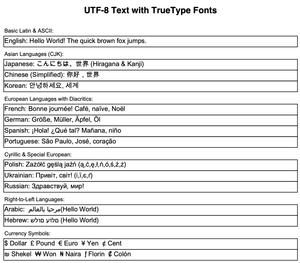
Q: Does it work with Unicode text? A: Yes! Full UTF-8 support including Chinese, Arabic, emoji.
Q: Can I modify the source code? A: Yes! Full unencrypted source code is yours to modify.
Create Professional Tables - €50
💡 Bundle & Save: Buy 2 modules, get 1 free! View All Modules →
Free version includes Cell() and MultiCell() for manual table creation.