Xojo FPDF - Pure Xojo PDF Generation with Full Unicode Support
Why Another PDF Library?
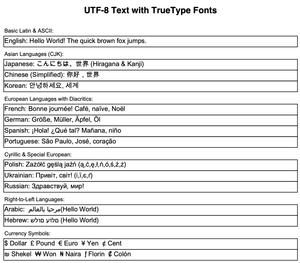
If you've ever tried to generate PDFs in Xojo with extensive Unicode text (Chinese, Arabic, Hebrew, Mathematical symbols, etc.), you know the challenges. While Xojo's built-in PDFDocument class works across platforms, it has significant limitations:
❌ ANSI Encoding Only - No true Unicode support, special characters and CJK languages don't work properly ❌ No Font Subsetting - Embeds entire 20MB font files instead of just the glyphs you use (massive file sizes) ❌ Closed Source - Can't inspect internals, fix bugs, or extend functionality yourself ❌ Limited Extensibility - Harder to customize for advanced PDF features
Xojo FPDF changes everything. 🚀
Get it here : Xojo FPDF on Github
If you like this library and would like to help me maintain it, you can make a donation
🌟 What Makes Xojo FPDF Special?
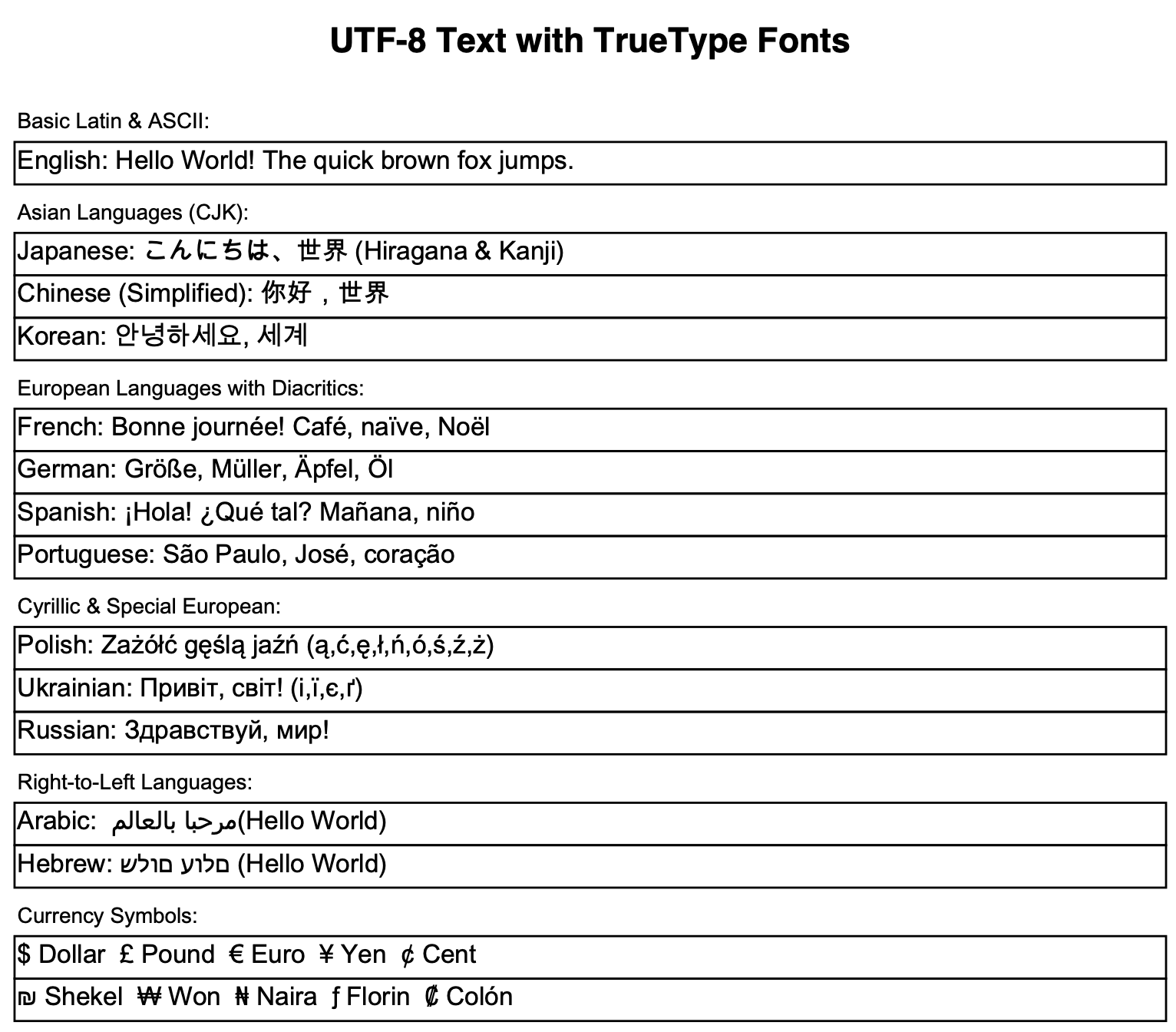
✅ Full Unicode Support
// Japanese, Arabic, Hebrew, Mathematical symbols - ALL WORKING!
pdf.AddUTF8Font("Arial", "", "/path/to/ArialUnicode.ttf")
pdf.SetFont("Arial", "", 14)
pdf.Cell(0, 10, "Hello World! 你好世界! مرحبا بالعالم! שלום עולם!")
✅ Arabic Text Shaping
Automatic contextual forms for proper cursive rendering - isolated, initial, medial, and final letter forms are handled transparently for all Arabic-script languages.
✅ Automatic Font Subsetting
Massive file size savings! Our TrueType font subsetter embeds only the glyphs you actually use:
- 📉 98% size reduction - 20MB Arial Unicode to 400KB subset
- 🎯 Sparse glyph IDs - Preserves original character encoding
- ⚡ Automatic - Happens transparently during font embedding
- 📦 Smaller PDFs - Perfect for web delivery and email
Xojo’s PDFDocument embeds entire font files, bloating your PDFs unnecessarily.
✅ Two APIs in One
VNSPDFDocument gives you two complementary APIs on the same object:
🔄 Xojo PDFDocument-compatible API - Drop-in replacement for Xojo’s built-in class:
- Same properties: Title, Author, Subject, Keywords, Creator, Language, CurrentPage, PageHeight, PageWidth, Landscape, Compressed
- Same methods: Save(), ToData(), AddFonts(), ClearCache(), Template()
- Graphics property returns VNSPDFGraphics (PDFGraphics-compatible wrapper)
⚙️ go-fpdf methods - Full access to the powerful FPDF API ported from Go:
- Text: Cell, MultiCell, Write, Text, Cellf, Writef
- Graphics: Line, Rect, Circle, Ellipse, Arc, Curve, CurveBezierCubic, Arrow, Polygon
- Transformations: TransformBegin, TransformEnd, TransformRotate, Transform
- Images: Image, ImageFromPicture, RegisterImage
- Links: AddLink, SetLink, Link, LinkString, Bookmark
- Attachments: AddAttachment, AddAttachmentAnnotation, AddEmbeddedFile
- And many more advanced PDF operations
Both APIs work together seamlessly on the same VNSPDFDocument instance.
✅ 100% Open Source & Pure Xojo
- No black boxes - Read and modify every line of code
- No declares - Works everywhere (Desktop, Web, iOS, Console)
- Community-driven - Contribute features, fix bugs, adapt to your needs
- Based on proven libraries: go-pdf/fpdf and original PHP FPDF
✅ Cross-Platform by Design
One codebase, four platforms:
- 🖥️ Desktop (Mac/Windows/Linux)
- 🌐 Web (Server-side generation)
- 📱 iOS (Native mobile PDFs)
- ⚙️ Console (Automated workflows)
90%+ shared code across all platforms! Tested on macOS, Windows 11, and Linux ARM64.
📦
Current Feature Set (v1.2)
Core Features
- ✅ UTF-8/Unicode - TrueType font support with full Unicode and Arabic text shaping
- ✅ Multiple Page Formats - A3, A4, A5, Letter, Legal, Custom sizes
- ✅ Text Methods - Cell, MultiCell, Write, Text with alignment and word wrapping
- ✅ Printf-Style Formatting - Cellf(), Writef() with %s/%d/%f format strings
- ✅ Graphics Primitives - Line, Rect, Circle, Ellipse, Arc, Bezier curves, Arrows, Polygons
- ✅ Transformations - Rotate, Translate, Scale, Transform matrix, TransformBegin/TransformEnd
- ✅ Image Support - JPEG, PNG (RGB/Grayscale/CMYK), ImageFromPicture for programmatic graphics
- ✅ Colors - RGB for text, fill, and draw operations
- ✅ Compression - FlateDecode/zlib (27-60% file size reduction, Desktop/Web/Console)
- ✅ Links & Bookmarks - Internal links, external URLs, hierarchical outlines
- ✅ Header/Footer Callbacks - Automatic page headers and footers with page count
- ✅ Metadata - Title, Author, Subject, Keywords, Creator, Language
- ✅ PDF Import - Import pages from existing PDF files as XObject templates with full parsing and nested XObject support
- ✅ File Attachments - Document-level and page-level annotation attachments (E-Invoice/Factur-X ready)
- ✅ PDFGraphics Wrapper - VNSPDFGraphics provides complete Xojo PDFGraphics API compatibility (41 features)
- ✅ GraphicsPath - Curves, arcs, round rectangles, clipping, hit testing via VNSPDFGraphicsPath
- ✅ Annotations - Text annotations and attachment annotations on pages
- ✅ Error Handling - Go-style error accumulation (Ok/Err/GetError)
- ✅ Bounds Checking - Optional exception mode for out-of-bounds drawing detection
PDFGraphics Compatibility (VNSPDFGraphics)
Full drop-in replacement for Xojo’s PDFGraphics class:
- ✅ Drawing - DrawLine, DrawRectangle, FillRectangle, DrawOval, FillOval, DrawPolygon, FillPolygon
- ✅ Text - DrawText (with optional rotation), TextWidth, TextHeight
- ✅ State - SaveState, RestoreState
- ✅ Transforms - Rotate, Translate, Scale
- ✅ Clipping - ClipToRectangle, Clip, ClipEnd
- ✅ Object2D Rendering - RectShape, OvalShape, RoundRectShape, ArcShape, CurveShape, FigureShape, TextShape, PixmapShape, Group2D
- ✅ DrawTextBlock - Word-wrap with CJK character-based line breaking (Chinese, Japanese, Korean)
🔒 Security (Free Version)
- ✅ Xojo-Compatible Permissions -
PDFPermissionsproperty, same API as Xojo PDFDocument - ✅ RC4-40 Encryption - Password protection with owner/user passwords (auto-upgrades to AES-128 with premium)
- ✅ PDF Permissions - Print, copy, modify restrictions
🎯 33 Working Examples
Every feature has a working example that generates a real PDF:
- Simple Shapes - Lines, rectangles, circles, Bezier curves, arrows
- Text Layouts - Cell, MultiCell, Write with alignment
- Multiple Pages - Multi-page documents with various shapes
- Line Widths - Different line styles, caps, joins, dash patterns
- UTF-8 & TrueType Fonts - Chinese, Arabic, Hebrew, Mathematical symbols
- Text Measurement - Precise alignment with GetStringWidth()
- Document Metadata - Title, Author, Subject, Keywords
- Error Handling - Ok(), Err(), GetError() patterns
- Image Support - JPEG, PNG files, programmatically drawn graphics
- Header/Footer Callbacks - Automatic headers with page count
- Links and Bookmarks - TOC, clickable links, PDF outline
- Custom Page Formats - Mixed page sizes in one document
- PDF/A Compliance - ICC color profiles for archival
- Document Encryption - RC4-40 password protection and permissions (free version)
- Watermark - Rotated diagonal background watermarks (45 degrees)
- Formatting Features - Printf-style formatters, font metrics
- Utility Methods - Version info, unit conversions, page size helpers
- Plugin Architecture - Premium feature separation
- Table Generation - Professional tables with pagination (premium demo)
- PDF Import - Import pages from existing PDFs as XObject templates
- Transformations - All 18 transform methods demonstration
- VNS PDF Graphics - Compares Xojo PDFDocument with VNSPDFDocument, full Unicode, rotations, transformations
- File Attachments - Document-level and page-level attachment annotations
- Bug Tests - Cross-platform testing suite for reported bugs
- HTML Import - Convert HTML file to PDF via LoadHTML() (Premium)
- Markdown Import - Convert Markdown file to PDF via LoadMarkdown() (Premium)
- GraphicsPath - Curves, arcs, round rectangles, clipping, hit testing
- E-Invoice - Factur-X/ZUGFeRD EN 16931 compliant invoice with embedded CII XML (Premium)
- E-Invoice Checker - Open PDF to check Factur-X/ZUGFeRD conformity (Premium)
- Digital Signatures - PAdES-B-B PDF signing + XAdES-BES XML signing (Premium)
- Barcodes - QR, Code128, EAN-13, DataMatrix, PDF417, and more (Premium)
All examples generate PDFs you can inspect in the pdf_examples/ folder!
💎 Premium Modules
Extend Xojo FPDF with optional premium modules. Each module is delivered as full, unencrypted Xojo source code - no black boxes, no compiled libraries. Same transparency as the free version. More information here.
🔐 Encryption Module - 50 EUR
Free version includes RC4-40 encryption + permissions. Premium adds:
- ✅ AES-256 - Strongest PDF encryption available (Revisions 5-6)
- ✅ AES-128 - Modern encryption without Acrobat warnings (Revision 4) - RECOMMENDED
- ✅ RC4-128 - Enhanced legacy support (Revision 3)
- 🔒 All encryption levels work with full permission control (print, copy, modify restrictions)
📊 Table Module - 50 EUR
- ✅ SimpleTable - Quick equal-width columns from RowSet data
- ✅ ImprovedTable - Custom column widths, automatic number alignment
- ✅ FancyTable - Styled headers, alternating row colors
- ✅ Multi-Page Tables - Automatic page breaks with header repetition
- ✅ Footer Calculations - Configurable footer with sum/count/average via VNSPDFTableFooterConfig
- ✅ Database Integration - Direct RowSet support from SQLite, PostgreSQL, MySQL, etc.
🗜️ Zlib Module - 50 EUR
Free version uses system zlib with Declares (Desktop/Web/Console only, iOS blocked by sandboxing).
Premium is 100% pure Xojo code - no declares, works everywhere:
- ✅ Pure Xojo Zlib - Complete DEFLATE/INFLATE implementation in Xojo
- ✅ iOS Support - Works on iOS where system zlib is blocked by sandboxing
- ✅ 60% Smaller PDFs - FlateDecode compression on all platforms
- ✅ No Dependencies - No system libraries, no declares, no third-party plugin, fully portable
🔮 PDF/A Module - Coming Soon
- Advanced archival features with full ISO compliance
- Automatic compliance validation
- Long-term preservation support
📝 Forms Module - Coming Soon
- Interactive PDF AcroForms
- Fillable text fields, checkboxes, radio buttons, dropdowns
- Form validation and calculation
🧾 E-Invoice Module - 50 EUR
- Factur-X / ZUGFeRD - Hybrid PDF/XML invoices (French/German/EU standard)
- EN 16931 compliance - 5 conformance profiles (MINIMUM to EXTENDED)
- CII XML generation - Automatic CrossIndustryInvoice XML
- PDF/A-3b - Self-contained hybrid PDF with embedded XML
- Digital Signatures - PAdES-B-B PDF signing + XAdES-BES XML signing, Adobe Acrobat validated
- Barcode Module - QR, Code128, EAN-13, EAN-8, UPC-A, Code 39, ITF, Codabar, DataMatrix, PDF417
- ReadEInvoice Checker - Validate conformity of received e-invoices
📄 HTML & Markdown Import Module - 50 EUR
- LoadHTML() - Convert HTML to PDF (headings, text formatting, tables, images, lists, links)
- LoadMarkdown() - Convert Markdown to PDF (headings, code blocks, pipe tables, images)
- Word HTML cleaning - Automatically removes bloat from pasted Word content
- 130+ HTML entities - Full entity support
- Custom tag handlers - Extensible parser for custom HTML tags and Markdown patterns
- Free converter apps - HtmlToPdf and MarkdownToPdf standalone apps for testing
💰 Pricing
- Individual modules: 50 EUR each
- Bundle: Buy 2, Get 1 Free = 100 EUR (save 50 EUR)
- Payment: PayPal only, manual delivery within 2-3 business days
- License: Lifetime, no subscriptions, all platforms, 12 months free updates
💡 Important: Premium modules are delivered as full, unencrypted source code - no black boxes, no compiled libraries. Same transparency as the free version!
💰 Flexible Pricing: You don’t need to buy all premium modules! Each module can be purchased individually based on your specific needs. Only pay for the features you’ll actually use!
🚀 Quick Start
// Create document (first page is added automatically)
Dim pdf As New VNSPDFDocument(VNSPDFModule.ePageOrientation.Portrait, _
                              VNSPDFModule.ePageUnit.Millimeters, _
                              VNSPDFModule.ePageFormat.A4)

// Set font (core font - no file needed)
pdf.SetFont("Helvetica", "", 16)

// Output text
pdf.Cell(0, 10, "Hello from Xojo FPDF!")

// Or use Unicode with TrueType font
pdf.AddUTF8Font("Arial", "", "/System/Library/Fonts/Supplemental/Arial Unicode.ttf")
pdf.SetFont("Arial", "", 14)
pdf.Cell(0, 10, "Hello! 你好世界! مرحبا بالعالم! שלום עולם!")

// Save PDF
If pdf.Ok() Then
  Dim f As FolderItem = SpecialFolder.Desktop.Child("output.pdf")
  pdf.Save(f)
Else
  MsgBox "Error: " + pdf.GetError()
End If
📚 Architecture Highlights
Smart Code Sharing
- All PDF logic in shared
PDF_Library/folder - Platform-specific only for file I/O and UI
- Conditional compilation for platform differences
- Module-based organization (VNSPDFModule, VNSPDFExamplesModule)
Clean API Design
- Consistent naming - All classes prefixed with VNS
- Go-style error handling - Ok/Err pattern
- Delegate callbacks - Header/Footer functions
- Printf formatting - Cellf(), Writef() for convenience
- PDFDocument compatible - Drop-in replacement for Xojo’s built-in class
Reference Implementations
Based on proven libraries with millions of downloads:
- go-pdf/fpdf (Go) - Primary reference
- PHP FPDF (PHP) - Original library (2000)
🚧 Known Limitations & Roadmap
We’re transparent about what doesn’t work yet:
Web Platform
- ❌ Color Emoji Support - Server-side Graphics API cannot access system emoji fonts
- 📋 Planned: Direct font file parsing (SBIX, COLR/CPAL, CBDT/CBLC formats)
iOS Platform
- ⚠️ No third-party plugins on iOS - iOS sandboxing prevents plugin usage
- ⚠️ Compression (Free) - System zlib uses Declares, blocked by iOS sandboxing
- ✅ Solution: Premium Pure Xojo Zlib (no declares) works perfectly on iOS!
Desktop/Console
- ✅ No known limitations - All features fully working
Bottom Line: Desktop and Console are 100% feature-complete. Web and iOS have minor limitations with workarounds available or in development.
Xojo FPDF Free v1.1.1 - Pure Xojo, Full Unicode, Cross-Platform - Xojo 2025r3.1 API2