Xojo FPDF - HTML & Markdown Import Module
📄HTML & Markdown Import Module
Turn Your Content into Beautiful PDFs Instantly
The Problem
Building PDF layouts by hand is slow and tedious. You call Cell(), MultiCell(), SetFont(), SetTextColor()dozens of times for every page. And when your content comes from a CMS, a WYSIWYG editor, or a Markdown file, you have to parse everything yourself - headings, bold, italic, lists, tables, images - line by line.
It takes hours of code to produce what should take one line.
The Solution
The VNS PDF HTML & Markdown Import Module lets you convert HTML or Markdown content directly into a formatted PDF with a single method call. Feed it an HTML string or a Markdown file, and it renders headings, text formatting, tables, images, lists, code blocks, and more - automatically.
pdf.LoadHTML(htmlContent)    // One line. Done.
pdf.LoadMarkdown(mdContent)  // One line. Done.
✨ Key Features
Full HTML Tag Support
- Headings:
<h1>through<h6>with scaled sizes and bold styling - Text formatting:
<b>,<i>,<u>,<s>,<sub>,<sup>,<code> - Block elements:
<p>,<div>,<blockquote>,<pre>,<hr>,<br> - Lists:
<ul>,<ol>,<li>(bullets and numbered) - Tables:
<table>,<tr>,<td>,<th>,<thead>,<tbody> - Images:
<img>with base64 data URIs and dimension support - Links:
<a href>with styled text - Legacy:
<font>with size, color, and face attributes - Inline styling:
<span style="...">for fine-grained control
Inline CSS Support
color- Text color (hex, RGB, named colors)font-size- pt, px, em, %, named sizes (xx-small to xx-large)font-family- Auto-maps to system TrueType or core PDF fontstext-align- left, center, right, justifytext-decoration- underline, line-throughbackground-color- Cell and element backgrounds
Complete Markdown Rendering
# Headingthrough###### Heading(h1-h6)**bold**,*italic*,~~strikethrough~~`inline code`and fenced code blocks (```)- Unordered (
- item) and ordered (1. item) lists [link text](url)andwith base64 support> blockquotes---horizontal rules- Pipe tables (
| col | col |with|---|---|separator)
130+ HTML Entities
- Basic:
&,<,>, ,©,®,€ - Accented Latin:
é,ñ,üand 50+ more - Greek letters:
α,β,Ωand 24+ more - Math symbols:
√,∞,∑,&integral;and 30+ more - Arrows, card suits, daggers, and more
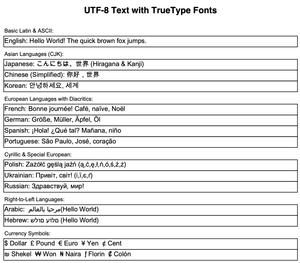
🌍 Full Unicode & International Text
Out of the box, LoadHTML() handles:
- Latin: French, German, Spanish, Portuguese, Italian
- Arabic: Full RTL with presentation forms (proper cursive rendering)
- CJK: Chinese (simplified/traditional), Japanese, Korean
- Cyrillic: Russian, Ukrainian, Bulgarian
- Greek, Thai, Hebrew and more
TrueType fonts are loaded on demand. The system font directory is searched automatically - no manual font paths needed.
🧹 Word & WYSIWYG HTML Cleaning
Real-world HTML is messy. Paste from Microsoft Word? You get 566 KB of bloated markup. Copy from a Summernote or TinyMCE editor? Inline styles everywhere.
The module cleans it all automatically:
- Extracts and preserves embedded images
- Strips binary data paragraphs (66% of Word bloat)
- Removes
<!-- CSS -->comment blocks - Strips
mso-*styles and Word-specific classes - Normalizes whitespace and entities
- Decodes numeric character references
Result: 58% file size reduction on real Word HTML. All content preserved, zero manual cleanup.
🔌 Custom Tag & Markdown Handlers
Extend the parser with your own logic:
// Custom HTML tag handler
pdf.RegisterHTMLTagHandler("company-header", AddressOf HandleCompanyHeader)

// Custom Markdown line handler
pdf.RegisterMarkdownHandler("::: warning", AddressOf HandleWarningBlock)
- Intercept tags before built-in logic
- Create custom tags like
<invoice-header>,<warning-box> - Add custom Markdown patterns like
::: note,{{variable}} - Full access to tag attributes and document state
💼 Perfect For
CMS & Web Apps Convert user-generated HTML content from Summernote, TinyMCE, CKEditor, or any WYSIWYG editor directly to downloadable PDFs.
Documentation Systems Generate PDF manuals and guides from Markdown source files. Perfect for technical documentation, API references, and knowledge bases.
Report Generation Build HTML templates with merge fields ({{customer_name}}, {{invoice_total}}), fill them at runtime, and render to PDF.
Email Templates Convert HTML email content to PDF attachments or archives. Handles inline styles and embedded images.
Content Migration Batch-convert HTML or Markdown files to PDF archives. The standalone converter apps let you test before integrating.
Word Document Import Accept pasted Word content from users. The cleaning pipeline handles the bloat automatically.
🆓 Try Before You Buy
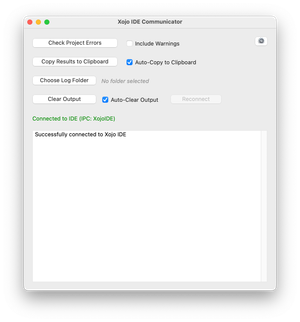
Free standalone converter apps are available for download:
Available for macOS (Universal), Windows (x86 64-bit), and Linux (x86 64-bit).
Test files are included (test_all_html_features.html and test_all_markdown_features.md) to demonstrate every supported feature. Try your own files and see the results before purchasing.
🔧 Pure Xojo Implementation
No External Dependencies
- 100% native Xojo code
- Works on Desktop, Web, iOS, and Console
- No DLLs, plugins, or external libraries
- Full source code included
Production-Ready
- Handles malformed HTML gracefully
- Automatic page breaks for long content
- Multi-page table support with header repetition
- Tested with real-world Word, Summernote, and CMS output
📝 Simple to Use
// HTML to PDF
Dim pdf As New VNSPDFDocument
pdf.AddUTF8Font("Arial", "", "")
pdf.SetFont("Arial", "", 12)
pdf.LoadHTML(htmlContent)
pdf.Save(outputFile)

// Markdown to PDF
Dim pdf As New VNSPDFDocument
pdf.AddUTF8Font("Arial", "", "")
pdf.SetFont("Arial", "", 12)
pdf.LoadMarkdown(markdownContent)
pdf.Save(outputFile)
Three lines of setup, one line to convert. That’s all it takes.
📊 Supported Elements at a Glance
| Element | HTML | Markdown |
|---|---|---|
| Headings (h1-h6) | ✅ | ✅ |
| Bold / Italic / Underline | ✅ | ✅ (bold, italic) |
| Strikethrough | ✅ | ✅ |
| Inline code | ✅ | ✅ |
| Code blocks | ✅ <pre> | ✅ fenced ``` |
| Ordered lists | ✅ | ✅ |
| Unordered lists | ✅ | ✅ |
| Tables | ✅ | ✅ pipe tables |
| Images (base64) | ✅ | ✅ |
| Links | ✅ | ✅ |
| Blockquotes | ✅ | ✅ |
| Horizontal rules | ✅ | ✅ |
| Subscript / Superscript | ✅ | - |
| Inline CSS | ✅ | - |
| Font tag (legacy) | ✅ | - |
| HTML entities (130+) | ✅ | - |
| Unicode (CJK, Arabic, Cyrillic) | ✅ | ✅ |
| Word HTML cleaning | ✅ automatic | - |
| Custom handlers | ✅ | ✅ |
✅ What You Get
- ✅ Full source code - Unencrypted, readable, modifiable
- ✅ Lifetime license - No subscriptions or renewals
- ✅ All platforms - Desktop, Web, iOS, Console
- ✅ 12 months free updates - Compatible with future versions
- ✅ Documentation - Detailed usage guides and examples
- ✅ Free converter apps - HtmlToPdf and MarkdownToPdf binaries included
🆚 Free vs Premium
| Feature | Free Version | Premium Module |
|---|---|---|
| LoadHTML() | ❌ Not available | ✅ Full HTML rendering |
| LoadMarkdown() | ❌ Not available | ✅ Full Markdown rendering |
| Word HTML cleaning | ❌ Not available | ✅ Automatic |
| Base64 image embedding | ❌ Not available | ✅ Automatic |
| Custom tag handlers | ❌ Not available | ✅ Extensible |
| 130+ HTML entities | ❌ Not available | ✅ Full support |
| Unicode auto-font loading | ❌ Not available | ✅ Automatic |
| Free converter apps | ✅ Download and test | ✅ Included |
Why upgrade? Building even a basic HTML-to-PDF renderer from scratch takes weeks. Table layout, text wrapping, image embedding, entity decoding, font mapping - all solved for you in one module.
💰 Pricing
One-Time Purchase: €50
Special Offer: Buy 2, Get 1 Free! Mix and match any premium modules. Perfect for combining HTML/Markdown with Encryption, Tables, Zlib, PDF/A, Forms, or E-Invoice.
What’s Included:
- VNSPDFHTMLPremium.xojo_code (parser and Markdown converter)
- VNSPDFHTMLRenderer.xojo_code (rendering engine)
- VNSPDFHTMLTableRenderer.xojo_code (table and CSS support)
- VNSPDFHTMLToken.xojo_code (tokenizer)
- HtmlToPdf and MarkdownToPdf standalone apps (full source)
- 12 months free updates
- Installation guide and documentation
💳 Payment & Delivery
Payment: PayPal only (secure payment processing)
Delivery: Manual process - please allow 2-3 business days after payment for delivery via email.
You will receive:
- 4 source code files (.xojo_code)
- HtmlToPdf and MarkdownToPdf app source code
- Complete documentation
- Installation guide
- License information
🛒 Purchase
PayPal payment button below. After payment, you’ll receive an email confirmation, and your module will be delivered within 2-3 business days.
Purchase HTML & Markdown Module - €50
❓ Frequently Asked Questions
Q: Does this work on all Xojo platforms? A: Yes! Desktop (Windows, macOS, Linux), Web, iOS, and Console applications.
Q: Can I load HTML from a file or only from a string? A: LoadHTML() and LoadMarkdown() accept string content. Read your file into a string first with BinaryStream or TextInputStream, then pass it to the method.
Q: Does it support external CSS files or stylesheets? A: Only inline styles (style="..." attribute) are supported. External CSS files and <style> blocks are not processed. For best results, use inline styles.
Q: Can it render images from URLs? A: Only base64-encoded data URIs are supported (<img src="data:image/png;base64,...">). Convert your images to base64 before embedding. File paths and HTTP URLs are not loaded.
Q: Does it handle nested tables? A: No. Nested tables are skipped. Each table must be a standalone element.
Q: What about colspan and rowspan? A: Not currently supported. Tables use equal-width columns. For complex table layouts, consider using the Table Module for precise control.
Q: Can I test it before buying? A: Yes! Download the free HtmlToPdf or MarkdownToPdf converter app and test with your own files. Available for macOS, Windows, and Linux.
Q: Is the source code obfuscated? A: No! Full, readable, commented source code is provided. Modify it as needed.
Q: Can I extend the parser with custom tags? A: Yes! Use RegisterHTMLTagHandler() to add custom HTML tag handling, or RegisterMarkdownHandler() for custom Markdown patterns.
Convert HTML & Markdown to PDF - €50
💡 Bundle & Save: Buy 2 modules, get 1 free! View All Modules →
Download the free HtmlToPdf and MarkdownToPdf apps to test conversion quality before purchasing.